7 Days to Die Trainer
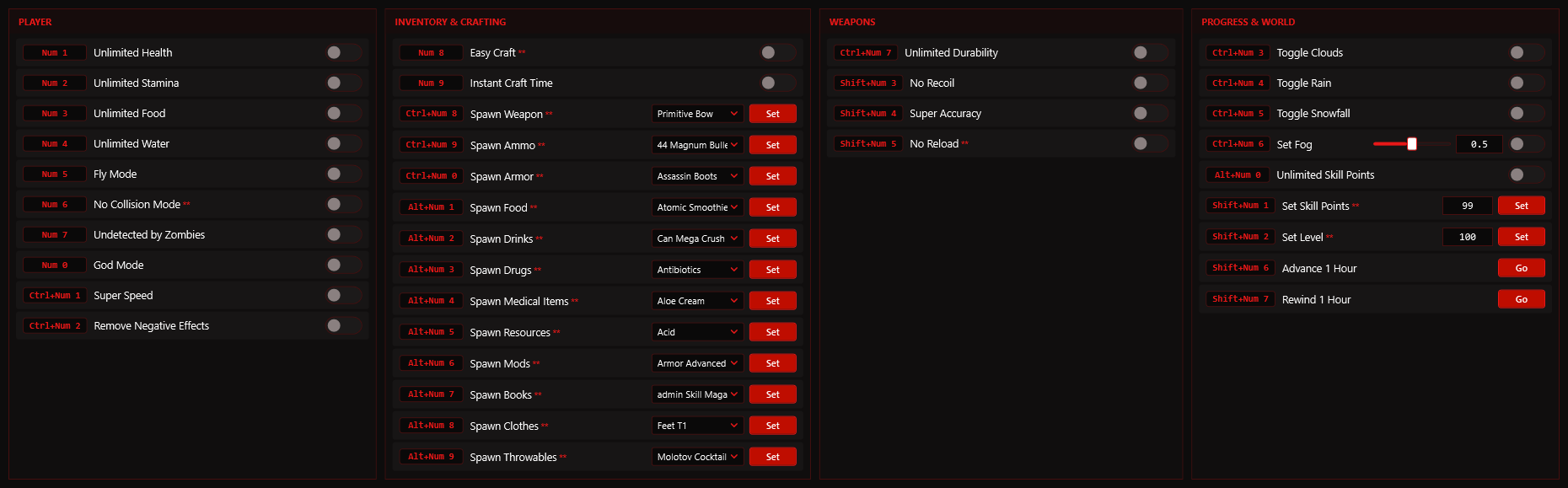
Open-world zombie survival where every seventh night the horde comes for your base. These 7 Days to Die cheats keep you fed, healed and unseen by zombies, put any weapon, armor or resource straight into your inventory and let you set your level, skill points, the time of day and the weather.
| Game | 7 Days to Die |
|---|---|
| Developer | The Fun Pimps |
| Game version | v26.10.2026 |
| Works with | Steam |
| Released | 25 Jul 2024 |
| Options | 37 |
| Last updated | 1 Nov 2026 |
Download
| File | Date added | File size | Downloads |
|---|---|---|---|
| 7 Days to Die v26.10.2026 Plus 37 Trainer.exe | 01 Nov 2026 | 3.6 MB | — |
Download trainer3.6 MB · free · no account needed
What the 7 Days to Die cheats cover
37 options in one trainer, each on its own hotkey. In short:
- God mode, unlimited health, stamina, food and water, remove negative effects, super speed
- Fly mode, no collision, undetected by zombies
- Spawn weapons, ammo, armor, food, drinks, drugs, medical items, resources, mods, books, clothes and throwables
- Easy and instant crafting, unlimited durability, no recoil, super accuracy, no reload
- Unlimited and set skill points, set level, advance or rewind the clock an hour, toggle clouds, rain and snow, set fog
The full hotkey list is printed inside the trainer window.
How to use it
- Start 7 Days to Die and wait until you are at the main menu.
- Run the trainer and leave it open in the background.
- Load your save, then press the key next to the option you want.
- Press the same key again to switch that option back off.
Note. Spawning items works when you play alone or host the game. Load into the world and move once before using Set Skill Points or Set Level. For Easy Craft, pick the recipe, then close and reopen the crafting window. No Reload does not cover rocket launchers. Level, skill points and spawned items are saved into your character, so back up your save first.
Other trainers


Comments
No comments yet. Be the first.